


Knowledgebase
Step by step user guide
How to create a Quick SMS
1. Choose SMS from the main menu
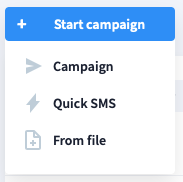
2. Press Start campaign button on the left top of the panel, then choose Quick SMS.

4. Add one or few recipients by inserting their mobile phone numbers and pressing plus button.

5. Insert text message manually or choose one of ready-to-use templates. More about templates
6. While entering the content, available symbols are counted automatically. According to the size of the text, quantity of messages is precised.

7. Launch your Quick SMS campaign.
Get in touch or create free account
Ready to get started?
Our bulk SMS service comes with cutting-edge tools which help to make your text messages go even farther and achieve better results.
Still inquiring? Contact sales
